


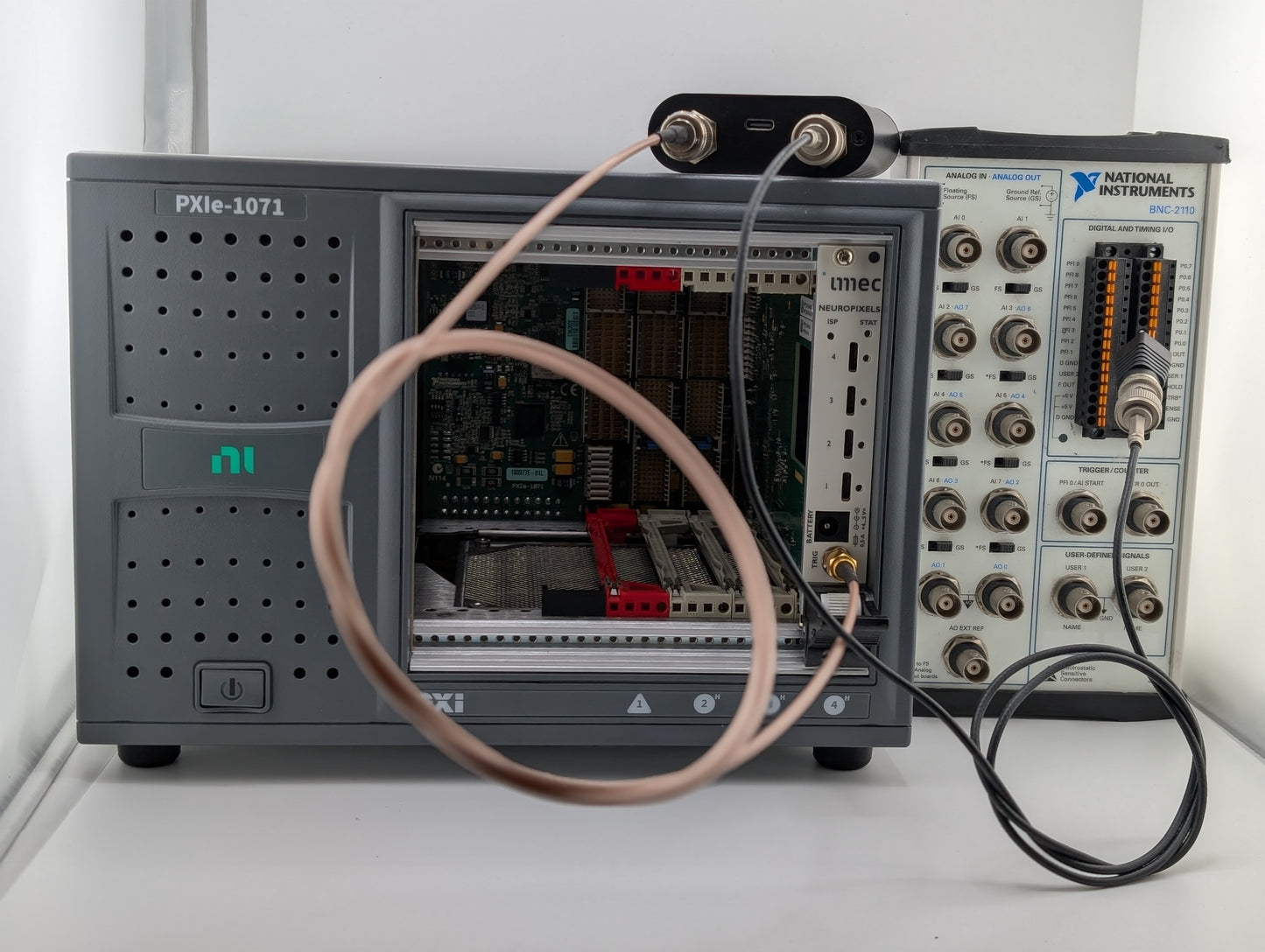
Why you need this
Your experiment involves multiple pieces of recording equipment with their own software packages and don't talk to each other. For example, you might be using a PXI board for acquiring Neuropixels data with a separate auxiliary data acquisition board (e.g., NIDAQ).
You need to accurately synchronize recorded data or events across these systems.
What it does
The Barcoder provides a common concept of time across all of the devices that form your experimental setup. It splits barcode outputs through standard BNC cables to all of your data acquisition devices, which records its barcodes along with whatever other data those devices capture. After your recording session, our python library identifies bar codes in each recording and converts time stamps from one system into the “time zone” of another.
How it works
The Barcoder outputs a different unique bar code every 5 seconds. Each bar code encodes a 16-bit number as a high start pulse followed by a “low” pulse, and then a "high" pulse, and so on for 16 pulses. But the number is not encoded by whether the pulse is high or low. Rather, pulses alternate between high and low, and the length of the pulse is either 10- or 5-ms long. Long pulses encode ones and short pulses encode zeros.
This type of code is much easier to reliably decode than a code that sets a TTL line high to encode “one” and low to encode “zero”, because for our strategy, the boundaries between consecutive bits are explicit rather than implicit (see the string of six consecutive 1's in A. vs B. in the figure below for an illustration of why explicit boundaries are preferable).
Our post-processing code automatically detects the bar codes and matches them between recordings from multiple devices, and then converts timestamps between recordings.
See below for a direct comparison of different barcoding strategies, graded from A to F.

Synchronization techniques. A. A bar code generated by the Barcoder. Each bit in the code is reliably decodable, even if you don't know the sampling rate. B. A bar code generated by other devices comprising a start marker followed by sequence of consecutive high or low bits. Where do these consecutive high or low bits start and stop? Confusing, potentially disastrous. C. A simple synchronization pulse every five seconds allows for alignment between devices, but fails catastrophically in the event of missing data/dropped frames. F. Too many experiments are still performed without any directly encoded synchronization at all, relying instead of the intrinsic timing accuracy of every individual component of the system.
In most devices, sampling rates are not exactly as stated, leading to desynchronization between devices. Even the smallest deviation in sampling rate diverges linearly with time.
Use case: Neuropixels and OpenEphys
As a typical example, consider recording from Neuropixels probes using the OpenEphys software. Your experiment involves a data acquisition chassis that contains an IMEC card that reads from the Neuropixels and a NI-DAQ card that records auxiliary signals. Unfortunately, these are captured as different “streams” with no common timebase, so it is impossible to accurately align events captured by the NI-DAQ card with the spikes recorded with the Neuropixels probe.
We at Pasadena Neurotech are enormous fans of OpenEphys, but we must caution that it is dangerously easy to load and analyze these data streams as though they are already aligned.
The Barcoder solves this problem. If you connect its output to the single digital input of the IMEC card as well as to the #1 digital input on the NI-DAQ card, you can do this:
!pip install ephysio

from ephysio import openephysio

expt = openephysio.Loader("/path/to/your/data")
spike_stream = expt.spikestream()
events = expt.nidaqevents(spike_stream)
The resulting events is a dictionary containing the time stamps of all digital events captured on the NI-DAQ card, converted into spike steam time. Likewise,
lfp_stream = expt.lfpstream()
lfp_events = expt.nidaqevents(lfp_stream)
returns those same events converted to the time units of the LFP stream.
Benefits
• Convenience
You may have ways to connect timeseries across devices by cross-matching identifiable events, but this is cumbersome and not necessarily reliable. The Barcoder is trivially easy to use and removes any question of reliability.
• Resilience
We all know that experimental recordings aren't always perfect. You load your data and find that the number of stimuli captured in the recording is not quite the same as the number you provided. Something is off, but what? Somewhere in the recording a segment of time may have gotten dropped, or perhaps the stimulator stopped working for a while. With the Barcoder, you have a much better chance to reconstruct what happened, because all your data are tagged with unambiguous timestamps. If an individual bar code is broken by one of your recording devices, the Barcoder software will detect this, and can still use the other bar codes to reconstruct the timeline.
Specifications
The Barcoder operates on 5 V using a standard USB-C input. You can power it from a computer or a wall charger–style brick. The Barcoder uses only a few mA of current. For convenience, the Barcoder has two BNC connectors that carry the same output sequence, synchronized to well below a microsecond. Each connector can source and sink 20 mA and may be “T-ed” (split) to a practically unlimited number of recording devices. The output level is 5 V.
Compatibility
The 5-V output from the Barcoder is compatible with devices from the vast majority of vendors, including our own picoDAQ. If you are uncertain of compatibility with your particular equipment, we will be happy to investigate.
Why barcoding is not to be ignored: a cautionary tale about offsets and drift
Offsets and drift are not to be underestimated, and we illustrate this point with a real world example here. TL;DR: we found up to 500 ms milliseconds of drift in 9 minutes of recording across two similar devices commonly used in real neuroscience experiments.
- Choosing a selection results in a full page refresh.
- Opens in a new window.